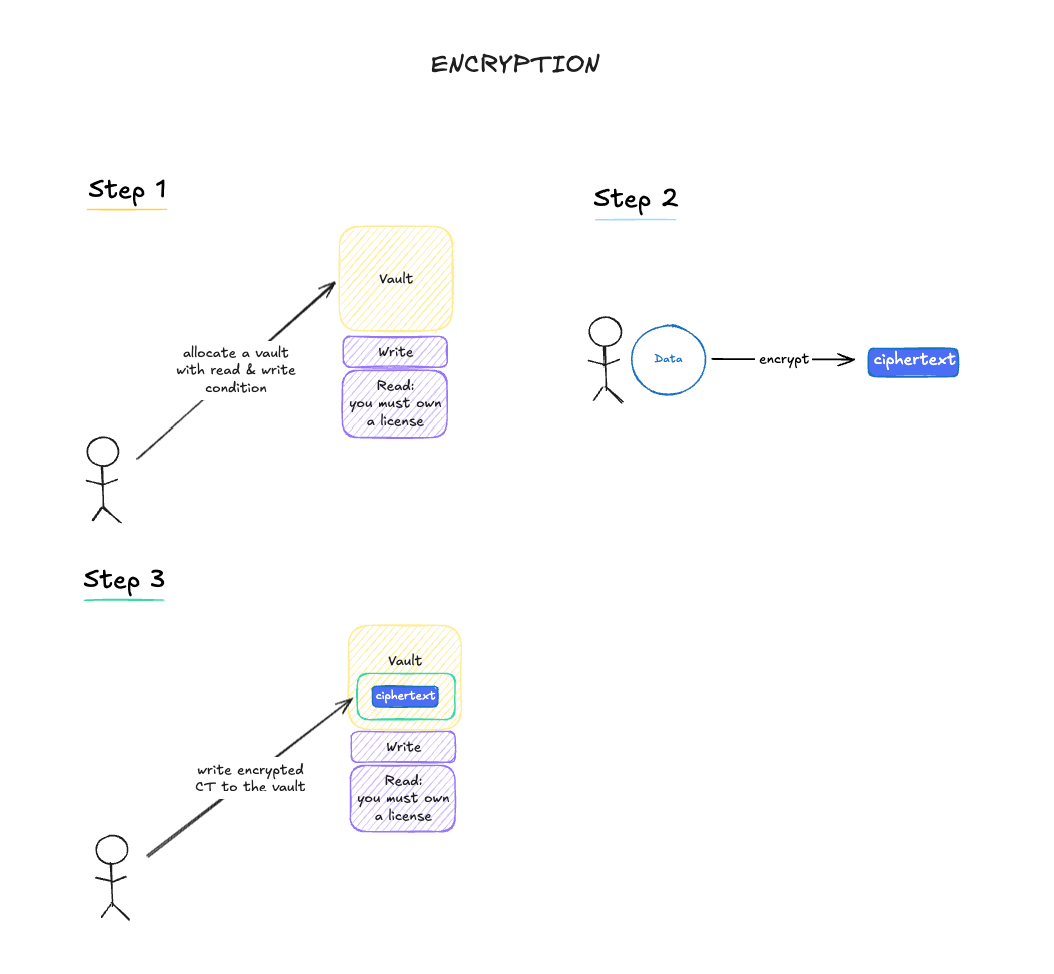
The diagram below shows the on-chain secret flow: allocate a vault, encrypt the
secret locally with TDH2, and write the ciphertext to the vault.
The simplest “owner-only” pattern uses your wallet (EOA) address as both the
write and read condition. The CDR contract bypasses the condition check when
msg.sender equals the configured condition address, so only that wallet can
write or read the vault. Because the high-level uploadCDR() helper validates
that condition addresses point at deployed condition contracts, EOA conditions
are configured through the low-level allocate() call with
skipConditionValidation: true.
import { initWasm, uuidToLabel } from "@piplabs/cdr-sdk";import { toHex } from "viem";await initWasm();// Assumes `client` and `walletClient` are already created (see Setup)const { uploader, observer } = client;const walletAddress = walletClient.account!.address;// Pure read: fetch the DKG global public keyconst globalPubKey = await observer.getGlobalPubKey();// Encode your secret as bytesconst secret = "my confidential data";const dataKey = new TextEncoder().encode(secret);// On-chain transaction: allocate a vault using the wallet address as the// write AND read condition. Only this EOA can write or read.const { uuid, txHash: allocateTx } = await uploader.allocate({ updatable: false, writeConditionAddr: walletAddress, readConditionAddr: walletAddress, writeConditionData: "0x", readConditionData: "0x", skipConditionValidation: true,});// Local: TDH2-encrypt the secret, bound to this vault's UUIDconst label = uuidToLabel(uuid);const ciphertext = await uploader.encryptDataKey({ dataKey, globalPubKey, label,});// On-chain transaction: write encrypted data to the vaultconst { txHash: writeTx } = await uploader.write({ uuid, accessAuxData: "0x", encryptedData: toHex(ciphertext.raw),});console.log(`Vault created with UUID: ${uuid}`);console.log(`Allocate tx: ${allocateTx}`);console.log(`Write tx: ${writeTx}`);
Any EOA address works as a write or read condition — only that EOA can
perform the matching action. To gate just one side, set your wallet address
on that side and a condition contract (such as LicenseReadCondition) on the
other. The high-level uploadCDR() helper expects deployed condition
contracts on both sides and does not support EOA conditions, so use it for
patterns like Story license-gated reads (see IP Asset
Vaults) and use the low-level
allocate() + write() flow above for owner-only EOA conditions.
The value of the transaction must be exactly the same as the fee.
dataKey is the historical parameter name. In encryptDataKey() it can be
any secret bytes, not just a cryptographic key.
Vault encrypted data is limited to 1024 bytes on Aeneid
(maxEncryptedDataSize). TDH2 adds overhead, so the maximum plaintext is
smaller. For larger content, use uploadFile() so only a small {cid, key}
payload is written to the vault.
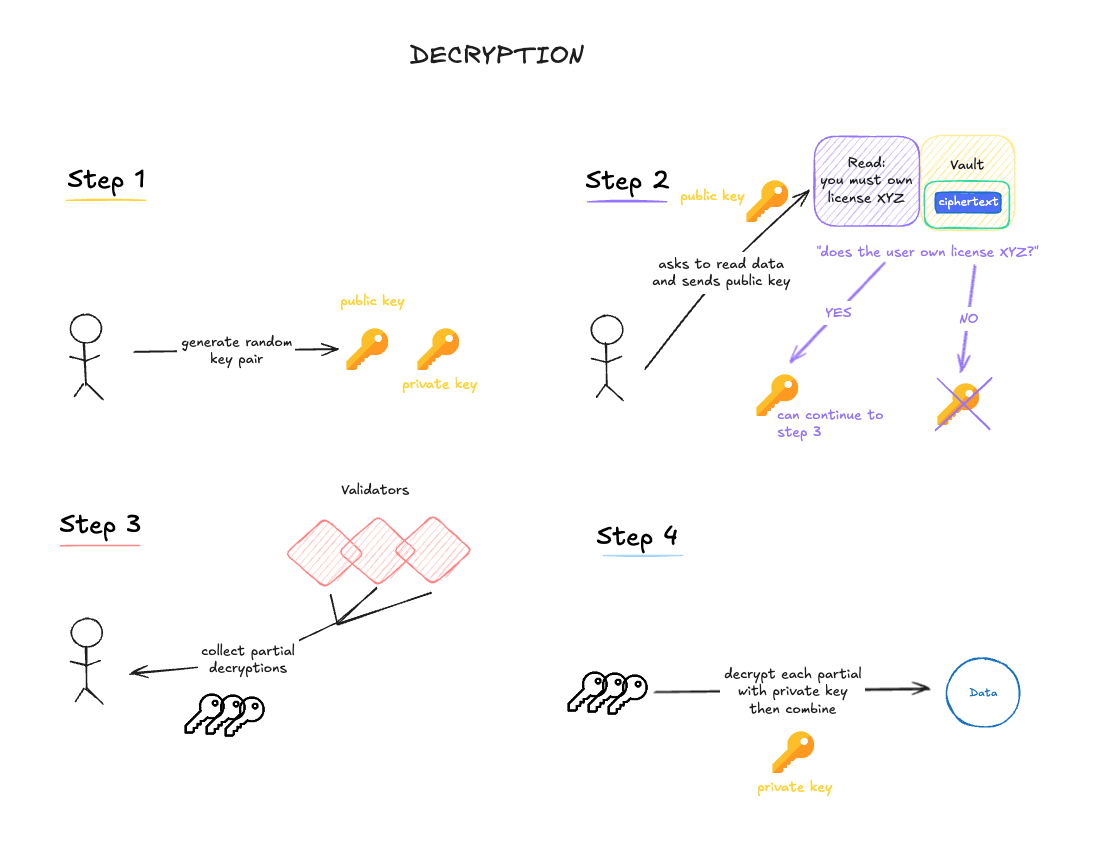
Decryption requires submitting a read request on-chain, collecting partial
decryptions from validators, and combining them client-side.
const { consumer } = client;// Sends 1 transaction, then collects partials and combines them locallyconst { dataKey, txHash } = await consumer.accessCDR({ uuid, accessAuxData: "0x", timeoutMs: 120_000, // wait up to 2 minutes for validators});const secret = new TextDecoder().decode(dataKey);console.log(`Read tx: ${txHash}`);console.log(`Decrypted secret: ${secret}`);
accessCDR() auto-generates the ephemeral keypair and auto-queries
globalPubKey when you omit them. The threshold is derived automatically
from the partial-decryption bucket’s DKG round.
The timeout of the request on the server side is 200 blocks, which is
approximately 7 minutes. If you’re not able to collect enough partials within
this timeout, try another read request.
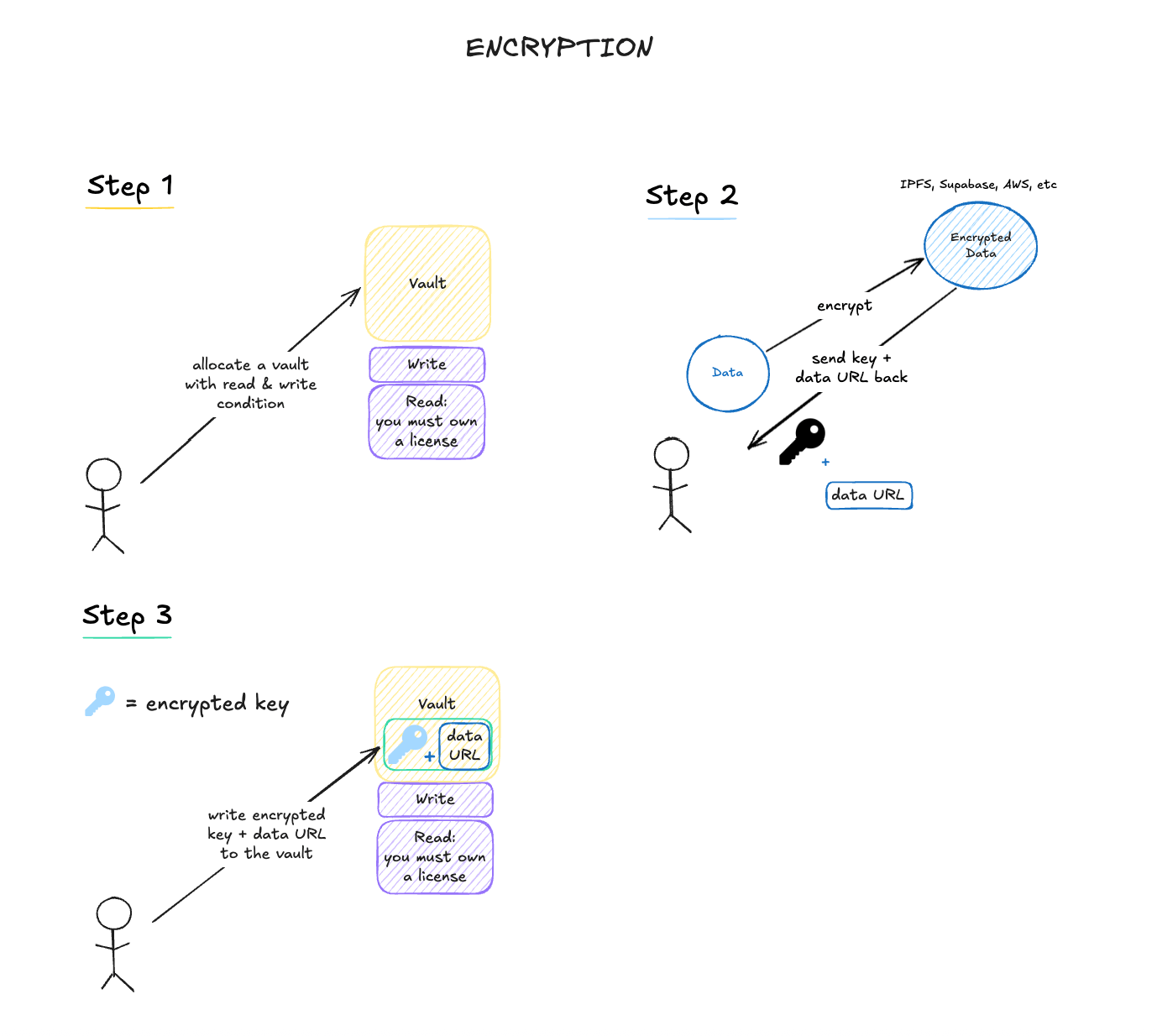
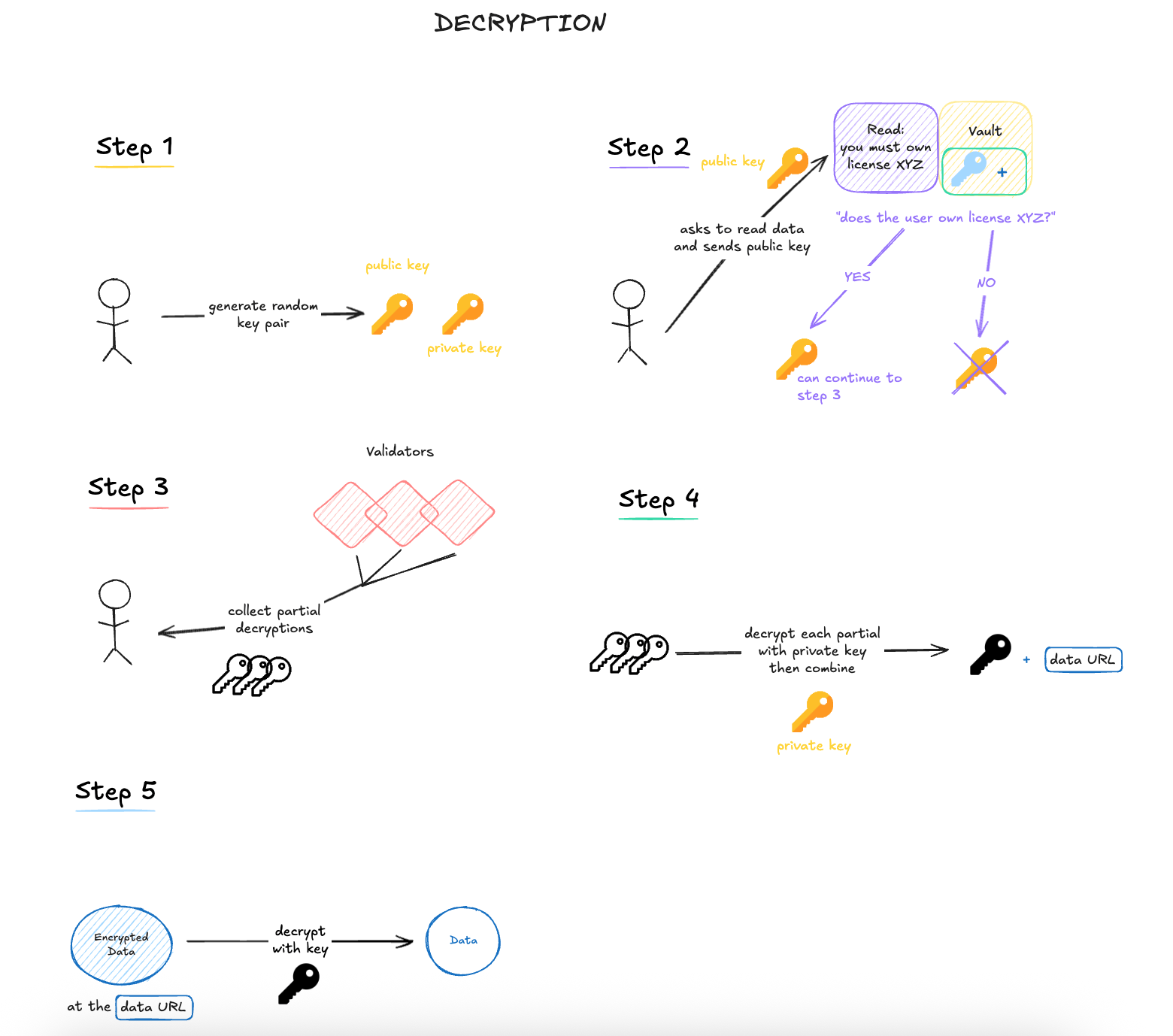
Use the file workflow when the encrypted payload should live off-chain and only
the encrypted file key plus pointer should be stored in the vault.Upload happens once by the data owner. Download happens later by an authorized
reader who recovers the vault payload and then decrypts the stored file.The uploadFile() helper requires deployed condition contracts on both sides,
so the example below uses Story’s OwnerWriteCondition for the write side and
LicenseReadCondition for the read side. License token holders can decrypt
the file (see IP Asset Vaults for the
end-to-end license setup). For an owner-only file flow, replicate the
low-level steps shown earlier with your wallet (EOA) address as both
conditions.
HeliaProvider is the only storage backend fully tested on Aeneid in the
current release, and it requires Node.js 22+.
uploadFile() and downloadFile() work with raw file bytes. In a browser,
start from a File object and convert it with new Uint8Array(await file.arrayBuffer()).